We gave the AI in Studio a face named Pogl
We gave the AI that edits games with you in Studio a character called “Pogl.” Like a member of a group chat, it speaks with a name and a face, and its expressions show what it is working on. After redrawing it many times, we settled on a single solid-color shape with pixel eyes.
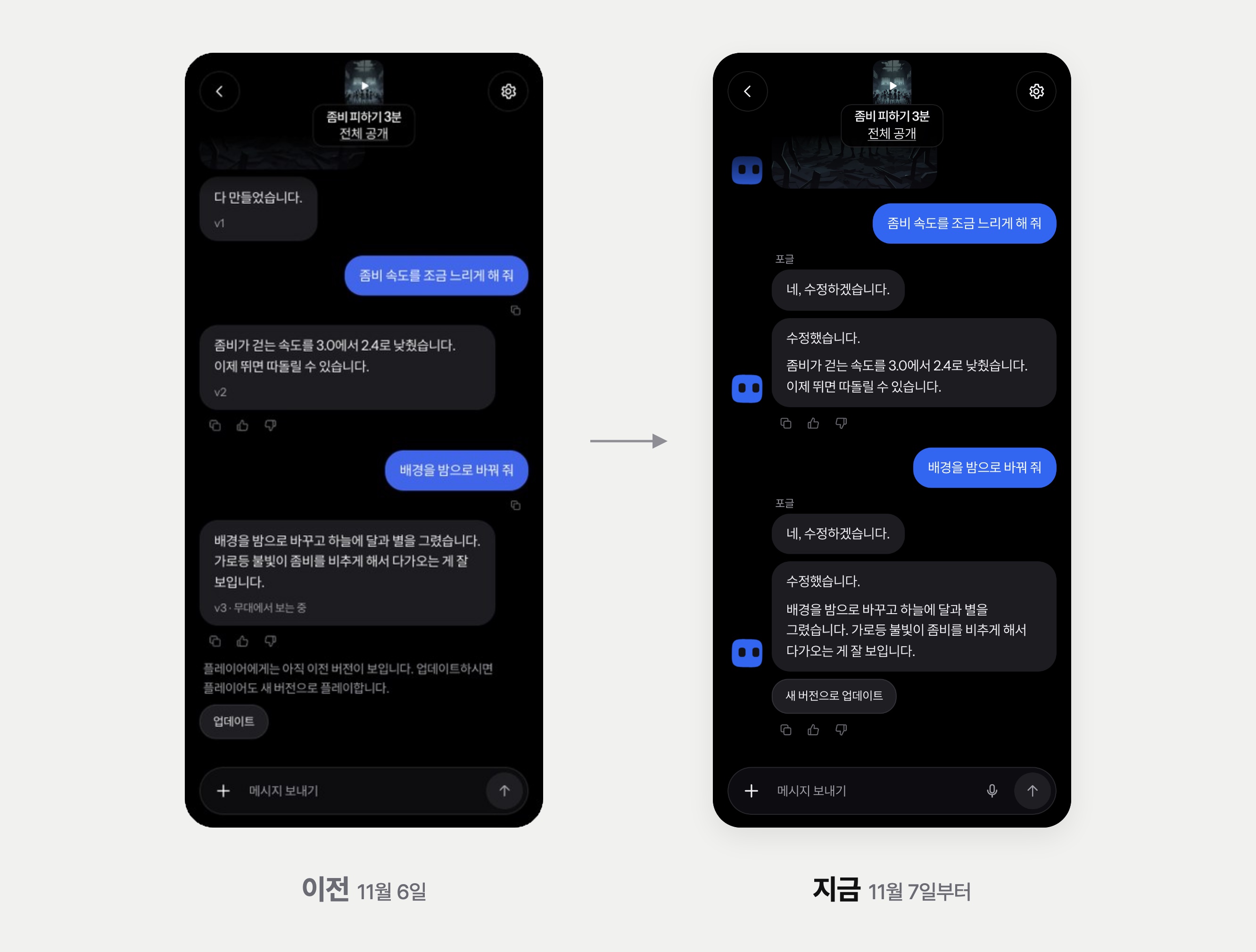
- On November 6 we turned Studio into a chat screen, but the AI that answered had no face. You had to read the text to know who had said what, or whether the AI was working right now.
- Since November 7, Pogl has been part of Studio chats. Like a member of a group chat, Pogl speaks with a name and a face, and its expressions show listening, thinking, working and done.
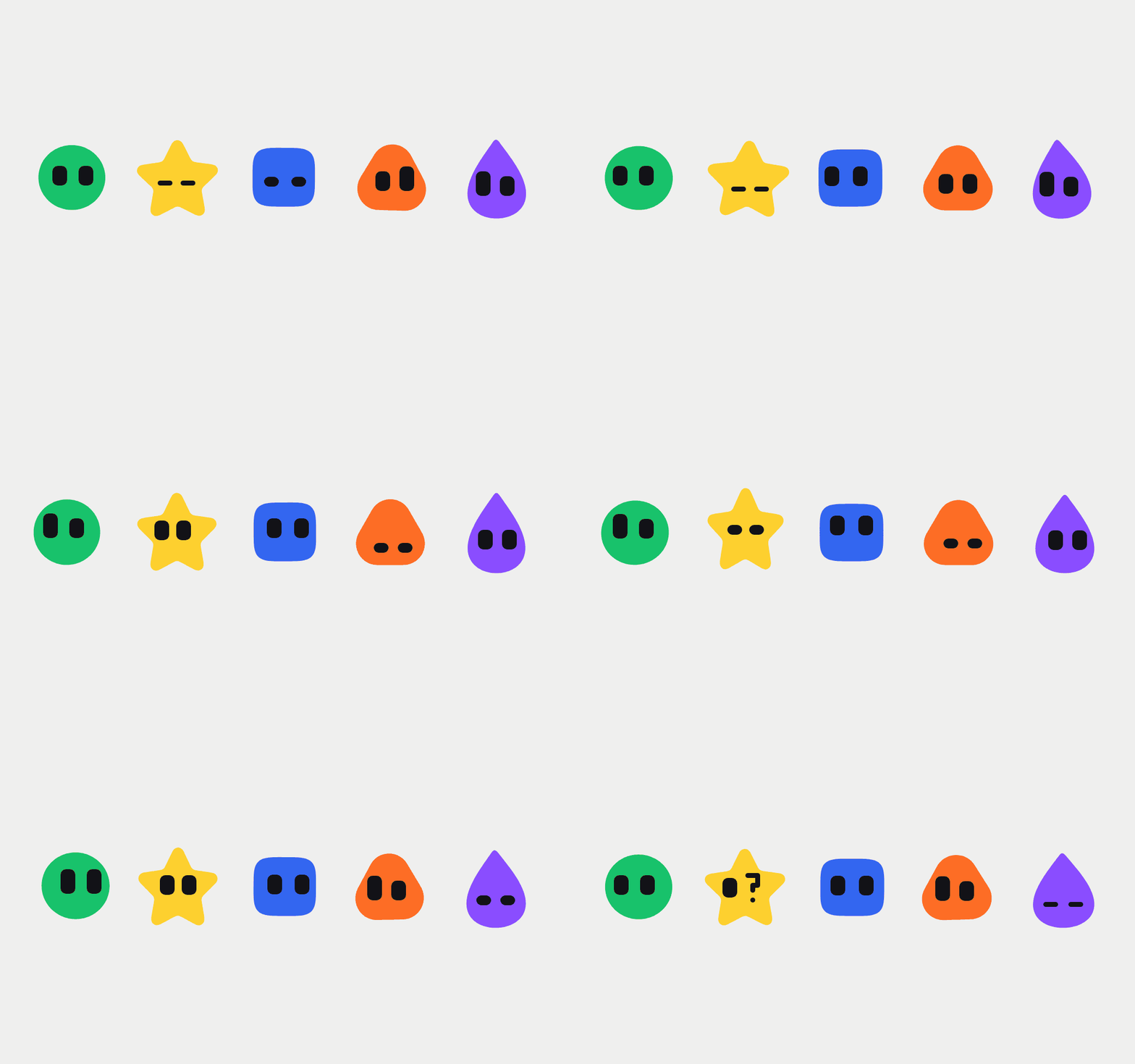
- Pogl is a single solid-color shape with pixel eyes. You can choose from five shapes and eight colors.
On November 6, we turned Studio into a screen where you talk with AI. This time, we gave the AI that answers in that chat a character called “Pogl.” Here is why it needed a face and what we went by when drawing it.
The side that answered had no face
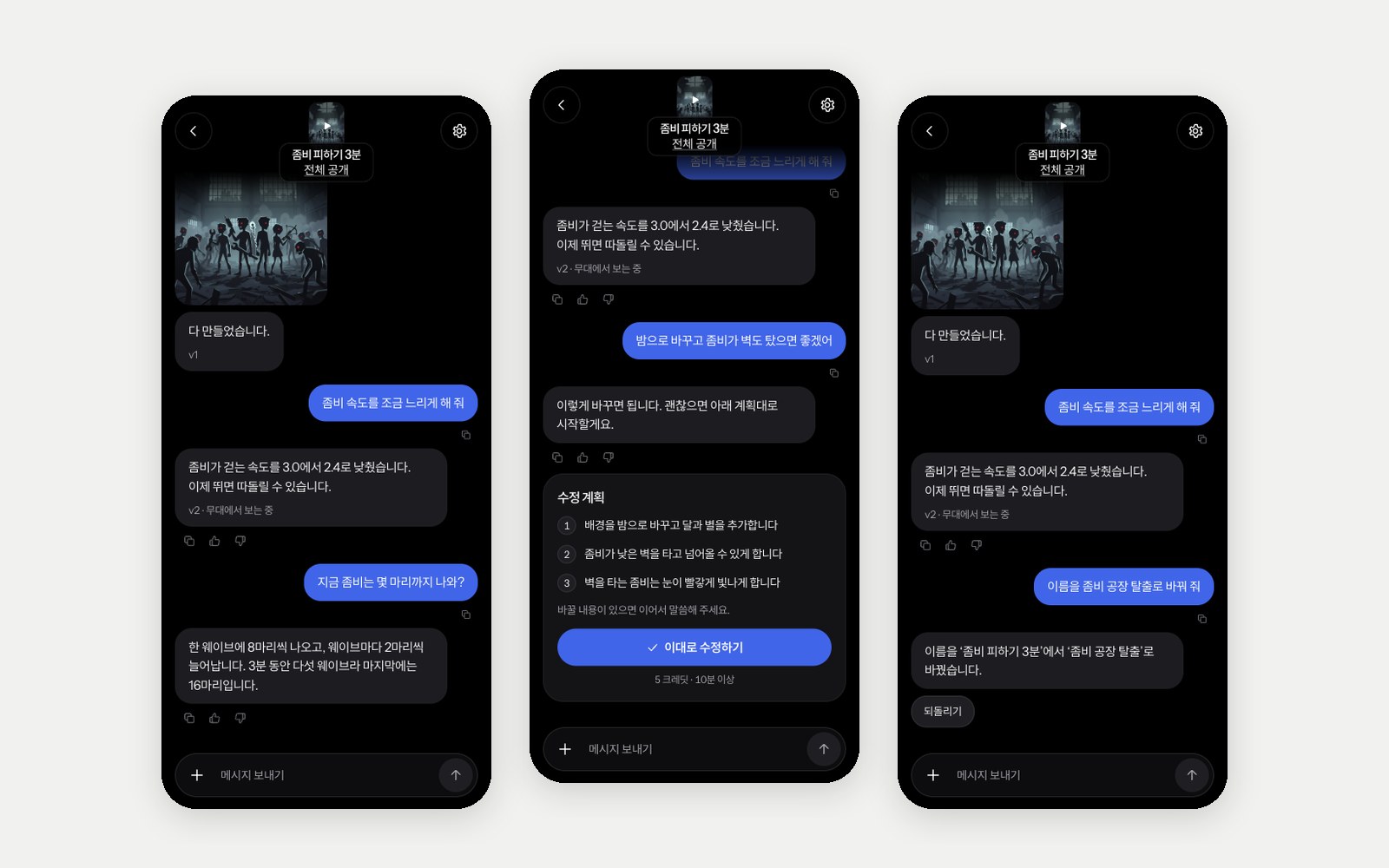
Even after Studio became a chat screen, the AI’s answers were gray speech bubbles with no name and no face. While a game was being edited, a single line saying “Editing in progress” stayed on screen, and you had to read it to know what the AI was doing.
It was even more confusing when several people edited together. An experience is edited in the same chat by up to 5 co-creators including the owner, and a clan experience by clan members with edit permission. But nothing showed who wrote each message, so another clan member’s message sometimes appeared as a blue bubble on the right, as if it were your own.
We looked at the characters of personal-assistant AI services
Many AI services that work like a personal assistant give their AI a character. These characters look simple, and their movements show whether they are listening or thinking right now. Users can tell what the AI is doing without reading any text.
We decided to make a character for the same purpose. For its name, we used the name of the service as it is: Pogl.
A member of a group chat, not a 1:1 assistant
The services we looked at are 1:1 conversations between a single user and the AI. So they put the AI’s face large at the top of the chat and use the whole screen for the conversation with the AI.
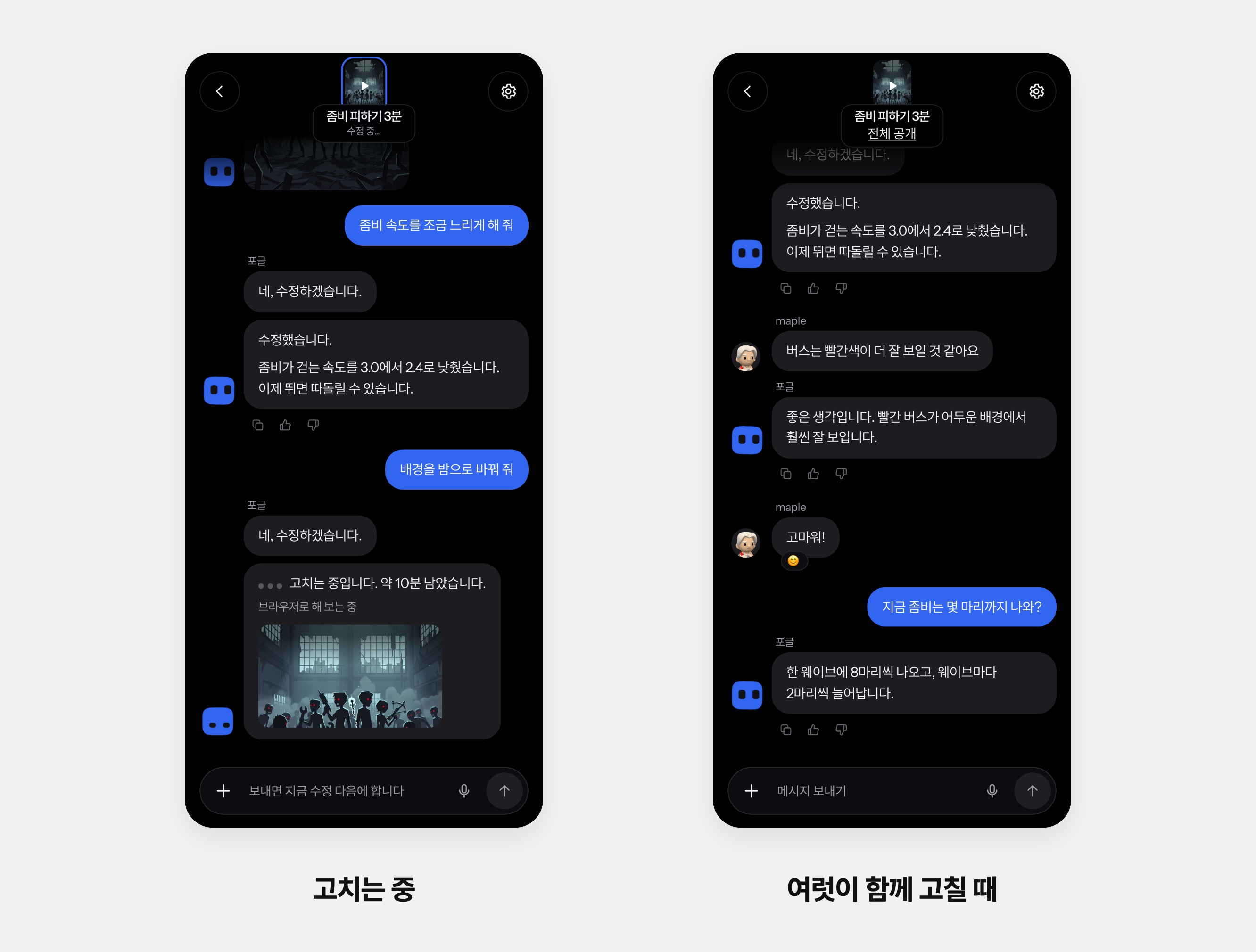
Studio on Pogl is different. One chat is one experience, and in that chat the owner, co-creators and clan members edit the game together. Pogl is one of the participants in that chat. So we arranged it the same way as a group chat in a messenger.
- At the top of the chat, we show the experience’s cover and name instead of the AI’s face.
- For each run of consecutive messages, we put the name above the first message and one face next to the last bubble. Pogl’s face is 32px, the same as people’s profile pictures.
- Only your own messages are blue bubbles on the right. Other people’s messages sit on the left with their name and profile picture, just like Pogl’s.
- Long-pressing a bubble to add a reaction or reply works the same way as in messages, group chats and clan chats.
Its expressions show what it is doing
Pogl’s expression changes with what is happening in Studio right now. While you type in the input box or speak into the microphone, it is listening; while it prepares an answer to a question, it is thinking; while it makes or edits a game, it is working. The moment a task ends, it shows done or failed once.
Only the most recent Pogl in the chat moves. The Pogl next to earlier messages stays still, and Pogl also stays still while waiting for a person’s turn, such as an answer to a question or a plan review. If Reduce Motion is turned on for your device, each state is shown as a single still image, and a Pogl that has scrolled off screen is not drawn.
We redrew it many times
We made and threw away many drafts before reaching the current shape. The fifth draft was the shape we first released on November 7, but it was too similar to another service’s character, so that night we changed it to the shape it has now.
Going through the drafts, we settled on two rules. First, the outline of the body stays still, and Pogl expresses itself with its eyes and small movements. Flipping or bouncing the whole body was distracting on a small chat screen. Second, we do not try to put the meaning of the service into the character. The more we added elements that recall Pogl, such as blocks or a game console, the more complex the character became, and a single common shape read best.
One solid-color shape and pixel eyes
- The body is a single solid-color shape. Whether Pogl is thinking or done, the shape stays the same when the state changes; it expresses itself only with its eyes and the body’s squash, stretch and small jumps.
- The eyes are drawn with chunky pixels. Each pixel is only on or off, and only the outer corners are rounded so the eyes don’t look out of place on a round body.
- The same eyes are used at the small size inside the chat. We did not keep a separate drawing for each size.
- We left out highlights on the body, sparkles in the eyes and a shadow on the ground. Some drafts had them, but it looked cleaner without.
You can choose your own Pogl
There are five shapes — circle, square, rice ball, star and drop — and eight colors: blue, white, black, green, yellow, orange, red and purple. Pogl starts as a blue square. Tap Pogl’s face in the chat or go to Settings › Display › Customize Pogl to change it, and the change is saved to your account. In the customize window, Pogl moves through its states one after another, so you can see how the shape and color you chose look in each state.
You can answer Pogl with a reaction
You can add emoji reactions to Pogl’s bubbles just as you can to people’s messages, and Pogl reads what the reaction means. Add 👍 to “Shall I publish?” and it publishes; add 👍 to “Shall I continue?” and it carries on. If the reaction simply means you like something, Pogl does nothing. Edits and rollbacks that cost credits never start from a reaction alone.
Pogl also adds reactions to your messages when it fits. There is no fixed rule for which emoji to use; Pogl decides by reading the conversation. The notification you get when a game is finished also comes as a message from Pogl, with Pogl’s face.