We built chat and calls for clans so you can play games together
We added text channels, voice channels, role-based permissions, moderation tools and bots to clans, along with friend calls and group calls. We looked through chat logs and feedback to find why conversations were moving to outside messengers and built the features one by one. AI checks every chat and call.
- After we opened clans on October 22, chat logs kept showing messages that tried to exchange outside messenger IDs and invite links. When we gathered feedback, we found that chat was missing many features, including emoji reactions, photos and GIFs, calls, channels and permissions.
- We built the requests one after another. Chat, messages, group voice chat and calls now all work inside Pogl, and you can play games while on a call with friends.
- AI checks every chat and call. Swearing, outside contact details, sexual language and hate speech are masked the moment a message is sent, and voice is transcribed for each speaker and reviewed.
We added text channels, voice channels, role-based permissions, moderation tools and bots to clans in Pogl, along with friend calls and group calls. This post covers why we built them, how each feature works, and how we keep conversations safe.
Conversations were moving off the service
We opened clans on October 22. Players could create and join clans, chat with clan members, and join the same game right away. On October 28 we also added group chats with several friends.
As the number of clans grew, the same kind of message kept appearing in chat logs and moderation logs: attempts to exchange outside messenger IDs or invite links to group chat rooms. Sending outside contact details was already blocked, but people kept trying by splitting the words across several messages.
So we actively collected user opinions and feedback. Pogl’s chat was still missing many features. People needed emoji reactions on messages, sending photos and GIFs, calls, channels and permissions.
When users move to an outside messenger, their conversations are cut off from the game. Also, most Pogl users are teenagers, and we cannot take responsibility for the safety of conversations held outside Pogl. We cannot review reports or apply penalties there.
So we started building everything people need inside Pogl, so that they do not have to leave.
We built the requests one after another
We did not build everything at once. We built and released each feature in the order the requests came in.
- October 28 · Channels and permissions. Clan chat can be split into several channels, and each role can be set to view or write in each channel.
- October 30 · Alliances. This request came from a community post. When two clans form an alliance, members of both clans get a shared chat.
- November 1 · Role mentions. This request came from a community post. “@role” sends a notification to every member with that role.
- November 18 · Chat bans and blocking. We built two features requested through support inquiries: one that stops a member from talking for a set time, and one that stops spam that repeats the same message.
- November 20 · Bots and calls. Along with a clan bot requested through support inquiries, we built voice channels, friend calls and group calls.
Channels and roles set permissions
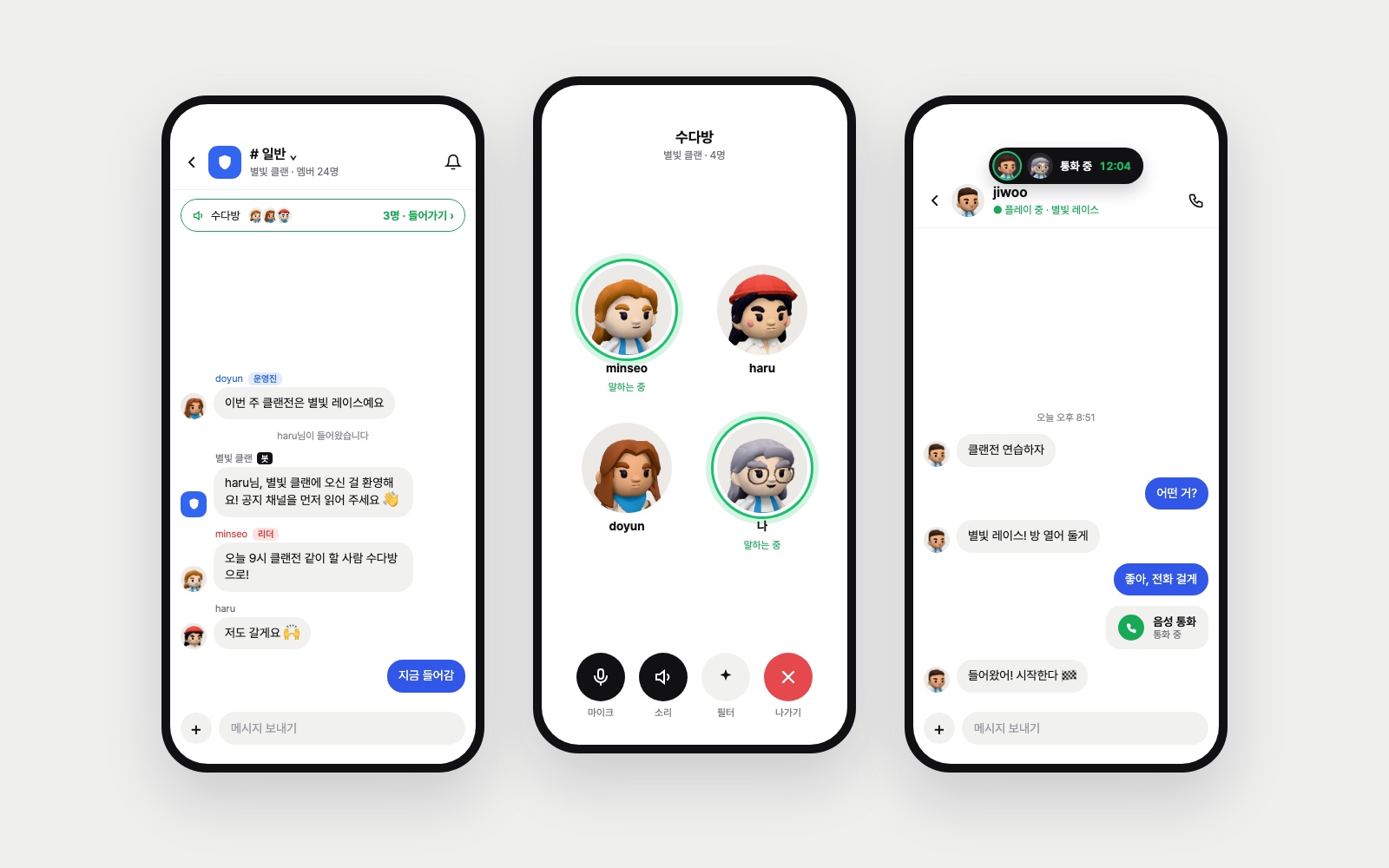
Clan chat is divided into channels. There are text channels for writing and voice channels for talking. Tapping the channel name at the top of the chat opens the channel list, and on PC the channel list is always shown on the left. Voice channels that have people in them right now are shown in one line at the top of the chat.
Permissions are set by role. When the leader creates a role and chooses its name and color, that color is shown on names in the chat and in the member list. In each channel, “View” and “Write” are turned on or off for each role. In a voice channel, Write means Speak.
We did not add presets such as “only moderators can write in announcements,” because who the moderators are differs from clan to clan. Instead, the role list lets you set the two switches for each role, and a new channel starts out with every member able to view and write in it.
Management permissions are also attached to roles. Member management, channel management, chat management, bot management and alliance management can each be given to a role separately, and the leader always has every permission. Management permissions can only be used on members of a lower rank.
We added the moderation tools needed to run a clan
- Chat bans. Choose 5 minutes, 1 hour, 1 day, 1 week or permanent. The remaining time stays the same even if the member leaves the clan and joins again.
- Kicks and bans. A banned person cannot come back through a join request, an invite link or an open clan.
- Spam prevention. If someone sends the same message twice within 1 minute, they cannot send it a third time for a short while. Messages that differ only in spacing or punctuation count as the same message.
- Hiding messages. Members with chat management permission can hide messages from lower-ranked members.
- Notifications. “@role” notifies the members with that role, and “@everyone” notifies all members. @everyone can be used up to 3 times a day.
- Turning off chat. Clans that do not use chat can turn it off. Past messages are hidden, not deleted.
Clan managers can set up bots
The requests we received through support inquiries were “send messages at set times” and “welcome messages.” Accepting bot code written outside Pogl would make anything possible, but it would also open a way for unchecked messages to appear in clan chat. So we do not accept bots as code. Instead, clan managers set them up on screen. Any role with bot management permission can do this.
- Welcome message. Sent once when a new member joins. If you put “{name}” in the message, it is replaced with the new member’s ID.
- Scheduled messages. Sent once, every day, or on chosen days every week. Each clan can create up to 5.
- Commands. When someone sends a word the clan has set, such as “!rules,” the bot replies with a preset message. Each clan can create up to 10.
- New experience posts. When a clan experience is published, the bot posts its experience card.
Bot messages are shown with a “clan name + Bot” badge and the clan emblem. Like messages from people, they support read receipts, translation, reactions and replies. Text entered for a bot goes through the same check as people’s messages when it is saved, and it is not saved if the check cannot run.
You can play games together while on a call
- Voice channels. Join a clan voice channel to talk with the members in it. Up to 16 people can be in one channel, and you leave automatically after being alone for 10 minutes.
- Friend calls. You can call a friend you follow each other with directly from your message chat. A call not answered within 45 seconds becomes a missed call, and when a call ends, a one-line call record stays in the chat.
- Group calls. Calls can also be started in group chats. When the first person joins and starts the call, the other members get a notification.
The main point of calls is that you can talk while playing. During a call, you can swipe through the feed, enter a game or move to Studio, and the call does not end; it continues in a small call bar at the top of the screen. After 3 seconds the bar folds down to show only faces, and you can drag it to any of the four corners of the screen.
Games also have voice chat that lets you hear players near you. When the two overlap, the call takes priority. During a call, the game’s microphone is not turned on, and you can only listen to game voice. This switches automatically, so there is nothing to choose.
We also added settings for people who do not want calls. In settings, you can choose to receive calls from “friends only” or not at all. In a voice channel, you can mute a specific person or turn off listening entirely, and people who have blocked each other cannot hear each other. There are also 8 filters that change your voice, such as robot and chipmunk.
AI checks every chat and call
Since we brought conversations into Pogl, keeping them safe is also our responsibility. AI checks every message in clan chats, messages, group chats and game chat, and everything said in voice channels, calls and in-game voice chat.
Text is checked the moment it is sent. For common swear words, only that word is masked as “**” before the message is sent. If a message contains outside contact details, sexual language, hate speech or threats, the whole message is masked character by character before it is sent. Messages split into short pieces are joined with the piece sent just before and checked again. The original text before masking is kept in a log that only our operations team can see.
We kept the range of what we block narrow. Talking about names, ages or schools in a conversation, or sharing a Pogl ID, is not blocked; only ways to contact people outside the service are blocked. At first the criteria were broader, and ordinary conversations were sometimes blocked, so we changed them at the end of October.
Voice is heard by an AI used for moderation. It splits each speaker’s speech into short pieces, transcribes them, and reviews them in four categories: asking for outside contact or a meeting, sexual language, hate speech and threats, and swearing at another person. The results and the audio are kept for 30 days. When a report comes in, the audio from that call is attached to the report, and our operations team listens to it directly. If a violation is confirmed, a voice chat ban is applied, and the ban gets longer each time it is repeated.
What’s next
Next, we are preparing “@online,” which notifies only the clan members who are online right now, and a bot feature that posts clan battle results and leaderboard first-place news. These features also started from feedback from users who run clans. If you need a feature while using clans, please let us know in the community or through support.